Nutrikonverter Guide
How to Read a Thai Nutrition Facts or GDA Label
5 min read
Last checked against the current label formats: September 2026
A Thai nutrition label packs a lot into a small box. This guide explains each line in the order your eye hits it, whether the product carries the full Nutrition Facts table or the four-cylinder GDA graphic.
This is a plain-language reading guide. The official label formats are set out in Ministry of Public Health Notification No. 445 (Nutrition Facts) and Notification No. 466 (GDA). If you're building a label, check your numbers against those notifications before printing.
Which one am I looking at?
Thai packaging carries one of two formats. The Nutrition Facts table (ข้อมูลโภชนาการ) is the full breakdown: a boxed table listing energy plus around a dozen nutrients, each with its %Thai RDI. The GDA graphic (Guideline Daily Amounts, จีดีเอ) is the compact version: four connected cylinders for energy, sugar, fat, and sodium. It is used on snacks, bakery items, and a few other mandatory categories, and is sometimes printed on the front of the pack instead of the back.
Reading the Nutrition Facts table
Read the label from top to bottom, in the order it's printed.
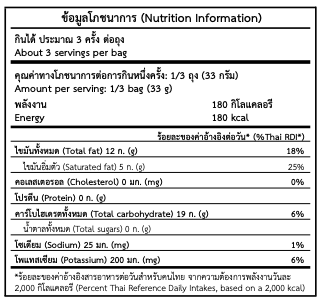
A Thai Nutrition Facts table, per package
Start with the serving line
The top line tells you how the numbers below are being counted. "ให้ประมาณ 3 ครั้ง ต่อถุง" (about 3 servings per bag) and "1/3 ถุง (33 กรัม)" (1/3 bag, 33 g) mean every number under it applies to one-third of the package. If you eat the whole bag, multiply everything by the number of servings.
Check energy per serving
พลังงาน (Energy) is the first number in the table, in kilocalories (กิโลแคลอรี). On the reference label, one serving is 180 kcal, so the whole 3-serving bag is 540 kcal.
Look at %Thai RDI, not just the gram amount
The right-hand column, ร้อยละของปริมาณที่แนะนำต่อวัน (%Thai RDI), tells you what share of a full day's recommended intake one serving uses up, based on a 2,000 kcal/day reference diet, the same baseline used across the region. A gram number alone doesn't tell you if that's a little or a lot; the percentage does.
Watch fat, sugar, and sodium: lower is generally better
ไขมันทั้งหมด (Total fat) and its subtype ไขมันอิ่มตัว (Saturated fat), น้ำตาลทั้งหมด (Total sugars), and โซเดียม (Sodium) are the nutrients worth limiting. As a rough guide, 5% RDI or less per serving is low, and 20% RDI or more is high. That makes it useful for comparing two products at a glance.
Protein, carbohydrate, and cholesterol fill out the rest
โปรตีน (Protein) and คาร์โบไฮเดรตทั้งหมด (Total carbohydrate) tell you what's fueling the calorie count, and คอเลสเตอรอล (Cholesterol) rounds out the panel. Some labels add potassium (โพแทสเซียม) and other micronutrients below the core line-up.
Reading the GDA graphic
The GDA format trades the full table for four numbers at a glance, built for a quick scan on a snack pack.
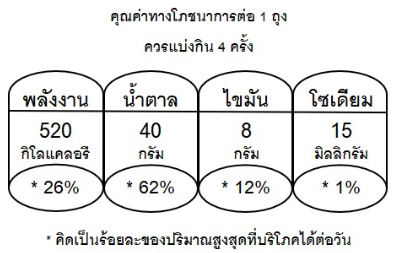
A Thai GDA graphic, per package
Check what the graphic is measuring first
Read the line above the cylinders first. "คุณค่าทางโภชนาการต่อ 1 ถุง" (nutrition value per 1 bag) and "ควรแบ่งกิน 4 ครั้ง" (should be divided into 4 servings) tell you whether the four numbers below describe the whole package or a fraction of it, and how many times to split it. On the reference graphic, the numbers are for the entire bag, split across 4 servings. Eating the whole bag at once means taking in all four numbers, not a quarter of them.
Scan the four cylinders
พลังงาน (Energy, kcal), น้ำตาล (Sugar, g), ไขมัน (Fat, g), and โซเดียม (Sodium, mg) are always shown in that order, each as a gram or kcal amount plus its own %RDI underneath, marked with an asterisk.
The %RDI under each cylinder is the fast comparison tool
Each cylinder's percentage is what makes GDA useful for quick decisions. If sugar is 62% RDI per package, finishing the bag gets you most of the way to a full day's recommended sugar limit.
Read the footnote, which defines the baseline
The line at the bottom, "คิดเป็นร้อยละของปริมาณสูงสุดที่บริโภคได้ต่อวัน" (calculated as a percentage of the maximum recommended daily intake), sets the baseline for the percentages. It's the same 2,000 kcal/day-style reference as the full Nutrition Facts table, condensed to four nutrients instead of a dozen.
Same idea, two formats
Both formats answer the same questions: how much is one serving, and how much of my daily limit does it use. They differ in how much detail they show. The Nutrition Facts table is the full picture, and the GDA graphic covers the four numbers shoppers check most: energy, sugar, fat, and sodium.
Building a label instead of reading one?
Enter your nutrient values once and get a print-ready Nutrition Facts or GDA label in Thai and English, sized to your actual serving.
Open the calculatorNeed real lab-tested numbers, not just a calculation? See our lab analysis coordination service